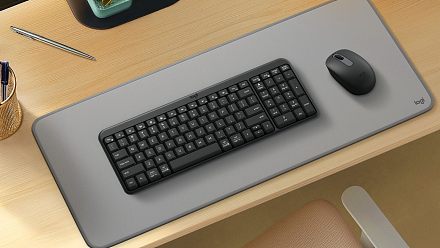
Streamline Your Workflow: Multi-Device Bluetooth Keyboards and Mice Under Rs 2,500
Working across a laptop, tablet and phone can quickly become awkward if every device needs its own keyboard and mouse. Multi-device Bluetooth peripherals solve that problem by allowing one keyboard, or keyboard-and-mouse
লেখক Consumer Trends Desk··11K বার পড়া
Streamline Your Workflow: Multi-Device Bluetooth Keyboards and Mice Under Rs 2,500
Working across a laptop, tablet and phone can quickly become awkward if every device needs its own keyboard and mouse. Multi-device Bluetooth peripherals solve that problem by allowing one keyboard, or keyboard-and-mouse combination, to connect to several devices and switch between them when required.
But connectivity is not the only thing worth considering. Keyboard layout, key mechanism, device-switching method, mouse precision, charging and portability can all affect day-to-day productivity. The five options here cost less than Rs 2,500 and range from full-size keyboard-and-mouse combos to compact keyboards designed for carrying between home, office and travel.
Quick Picks
Best overall: Amkette Wi-Key Max Multi Device
Best value keyboard-mouse combo: Portronics Key11 Combo
Best for a full-size work setup: Zebronics Companion 5002
Best compact keyboard: ASUS Marshmallow KW100
Best for travel: Yostyle Foldable Bluetooth Keyboard
Quick comparison
Product
Price was
Price now
Discount
Best for
Amkette Wi-Key Max Multi Device
Rs 3,499
Rs 1,949
44%
Multi-device productivity
Portronics Key11 Combo
Rs 3,999
Rs 1,699
58%
Value multi-device combo
Zebronics Companion 5002
Rs 4,499
Rs 2,199
51%
Full-size work setup
ASUS Marshmallow KW100
Rs 4,499
Rs 2,299
49%
Compact multi-device typing
Yostyle Foldable Bluetooth Keyboard
Rs 4,999Rs 1,949
Rs 2,474
51%
Travel and mobile working
1. Amkette Wi-Key Max Multi Device: Best for – Multi-device productivity across laptops, tablets and phones
Reasons to Buy
Keyboard and mouse both support three devices
Two Bluetooth connections plus 2.4GHz wireless
One-click device switching
Scissor-switch keyboard
Reasons to Avoid
Compact layout may take some adjustment for full-size keyboard users
No keyboard backlighting
Price: Was – Rs 3,499 | Now – Rs 1,949 | Discount: 44%
The Amkette Wi-Key Max is built specifically for users working across several devices. Both the keyboard and mouse can connect to three devices using two Bluetooth connections and one 2.4GHz wireless connection, with dedicated controls for switching between them.
The keyboard uses laptop-style scissor keys and supports Windows, macOS, iOS, Android and iPadOS. Both the keyboard and mouse have rechargeable 400mAh batteries with Type-C charging, while the mouse offers adjustable sensitivity up to 3200 DPI. Dedicated shortcuts for functions such as screenshots, calculator and AI assistants add to its productivity focus.
Best for: Users regularly moving between a computer, tablet and phone who want the keyboard and mouse to switch along with them.
2. Portronics Key11 Combo: Best for – A value multi-device keyboard-and-mouse setup
Reasons to Buy
Full-size keyboard with number pad
Keyboard supports three-device connectivity
Bluetooth and 2.4GHz wireless
Type-C charging
Reasons to Avoid
Mouse does not offer the same three-device configuration as the keyboard
Larger than compact keyboards for travel
Price: Was – Rs 3,999 | Now – Rs 1,699 | Discount: 58%
The Portronics Key11 offers a full keyboard-and-mouse combination while remaining comfortably below Rs 2,000. The keyboard can connect to three devices using two Bluetooth channels and the supplied 2.4GHz USB receiver. The mouse supports Bluetooth and 2.4GHz wireless connectivity.
The keyboard has a full-size layout with a number pad, which makes it more practical for spreadsheets and other number-heavy work than compact models. Both peripherals are rechargeable, and Portronics provides USB-to-Type-C charging. Compatibility covers Windows, macOS, Android and iOS.
Best for: Buyers who want an affordable full-size keyboard-and-mouse combination for switching between multiple work devices.
3. Zebronics Companion 5002: Best for – A full-size multi-device work setup
Reasons to Buy
Up to three Bluetooth connections on the keyboard
2.4GHz wireless connection
Full-size 109-key layout
Mouse supports two Bluetooth devices
Reasons to Avoid
Large keyboard is less portable
Mouse tops out at 1600 DPI
Price: Was – Rs 4,499 | Now – Rs 2,199 | Discount: 51%
The Zebronics Companion 5002 is another full-size option, but it goes further on connectivity. The keyboard supports three Bluetooth connections in addition to 2.4GHz wireless, while the mouse supports two Bluetooth devices plus the wireless receiver.
The 109-key keyboard uses scissor switches and includes integrated multimedia controls, a dedicated AI-assistant key and a Mac/Windows mode switch. Both the keyboard and mouse have Type-C charging ports. The mouse offers 800, 1200 and 1600 DPI settings, allowing its sensitivity to be adjusted for different workloads.
Best for: Users who want a conventional full-size desktop keyboard while retaining the ability to switch between several computers or other devices.
4. ASUS Marshmallow KW100: Best for – Compact multi-device typing
Reasons to Buy
Connects to three Bluetooth devices
1.6mm key travel
Multiple operating-system support
Quiet scissor-switch keys
Reasons to Avoid
Mouse is not included
Battery-powered rather than a rechargeable keyboard-and-mouse combination
Price: Was – Rs 4,499 | Now – Rs 2,299 | Discount: 49%
The ASUS Marshmallow KW100 is a keyboard rather than a keyboard-and-mouse set, but its compact design makes it particularly useful for users who do not need a number pad. Bluetooth 5.0 LE allows it to connect to as many as three devices and switch between them.
ASUS uses scissor-switch keys with 1.6mm travel and has designed the keyboard for quiet operation. Two-level adjustable kickstands allow the typing angle to be changed, while system-switch keys make it easier to move between Windows, ChromeOS, macOS, iOS and iPadOS layouts. The refreshed version also includes a dedicated Copilot key.
Best for: Users who value a compact, quiet keyboard and regularly switch typing between a laptop, tablet and other Bluetooth devices.
5. Yostyle Foldable Bluetooth Keyboard: Best for – Travel and working from tablets or phones
Reasons to Buy
Tri-fold portable design
Type-C charging
Scissor-switch keys
Windows, macOS, iOS and Android compatibility
Reasons to Avoid
Compact folding layout may require an adjustment period
Smaller keys are less suitable for prolonged desktop typing
Price: Was – Rs 4,999 | Now – Rs 2,474 | Discount: 51%
This foldable keyboard takes a very different approach. Its tri-fold design allows it to collapse into a much smaller package for travel, while the built-in touchpad means you do not necessarily have to carry a separate mouse.
It can connect to as many as three Bluetooth devices and supports Windows, macOS, iOS and Android. The keyboard uses low-profile scissor switches and includes a 140mAh rechargeable battery with Type-C charging. Claimed continuous working time is up to 48 hours, with an automatic sleep mode helping conserve battery when the keyboard is not being used.
Best for: Frequent travellers who work from a tablet or phone and want a keyboard and pointing device in one compact package.
How we chose
We compared the six options on their device connectivity, switching method, keyboard layout, key mechanism, mouse functionality, charging or battery arrangement, operating-system compatibility and current price. Greater weight was given to features that make a practical difference when working across a laptop, tablet and phone rather than connectivity claims alone.
Things to consider before buying a multi-device keyboard and mouse
Number of connected devices: Multi-device support can mean different things. Some keyboards maintain connections to three Bluetooth devices, while others combine Bluetooth with a 2.4GHz USB receiver. Check how many devices can remain paired and how you switch between them.
Keyboard and mouse switching: With a combo, check the two peripherals separately. A keyboard supporting three devices does not necessarily mean the bundled mouse can switch between the same three devices.
Bluetooth versus 2.4GHz: Bluetooth is useful for tablets and phones because no receiver is required. A 2.4GHz USB receiver can provide straightforward plug-and-play connectivity to a laptop or desktop and is useful on computers without reliable Bluetooth.
Full-size versus compact: A full-size keyboard provides a number pad and can be better for spreadsheets and data entry. Compact keyboards save desk space and are easier to carry, but may omit the number pad and rearrange some keys.
Scissor switches: Low-profile scissor keys can provide a laptop-like typing experience and generally require less key travel than conventional desktop keyboards. They can be useful if you prefer quieter, shorter keystrokes.
Rechargeable versus replaceable batteries: Rechargeable Type-C peripherals reduce the need to keep spare batteries around. Replaceable-battery models can offer much longer intervals between battery changes, but you cannot simply recharge them over USB.
FAQs
1. What is a multi-device Bluetooth keyboard?
A multi-device Bluetooth keyboard can remain paired with more than one computer, tablet or phone and lets you switch between those connections without repeating the full pairing process each time.
2. Can one Bluetooth keyboard connect to a laptop, tablet and phone?
Yes, if the keyboard supports at least three stored connections. Models such as the Amkette Wi-Key Max and ASUS Marshmallow KW100 are designed to work with up to three devices.
3. Can a multi-device mouse switch between computers too?
Some can, but check the mouse specification independently of the keyboard. The Amkette Wi-Key Max mouse supports two Bluetooth connections plus 2.4GHz wireless, for example, while the Zebronics Companion 5002 mouse supports two Bluetooth connections and a wireless receiver.
4. Is Bluetooth or a USB receiver better for office work?
Neither is universally better. Bluetooth avoids occupying a USB port and works well with phones and tablets. A 2.4GHz receiver can be convenient for a permanent desktop or laptop connection. A keyboard supporting both gives you greater flexibility.
5. Do I need a full-size keyboard for productivity?
Not necessarily. A full-size keyboard is particularly useful for spreadsheets, accounts and other work involving frequent numerical entry. A compact keyboard can be more comfortable if desk space and portability matter more than a dedicated number pad.
6. Is a foldable Bluetooth keyboard suitable for everyday work?
It can be useful for travel and occasional mobile working, especially when paired with a tablet or phone. For long daily typing sessions, however, a conventional full-size or compact desktop keyboard will generally provide a less cramped layout.
Disclaimer: The product descriptions mentioned in the article are solely based on the primary and secondary research conducted by our experts. To keep you ahead of the curve with these latest products, News18 utilises affiliate links. This means if you decide to shop through our recommendations, we may earn a small referral commission at no extra cost to you. Please be advised that News18 is not responsible for any claims under the Consumer Protection Act, 2019, or other applicable laws regarding the final performance, quality, or safety of these products.