These Budget Wireless Mouse Are A Must Have For Office and Gaming
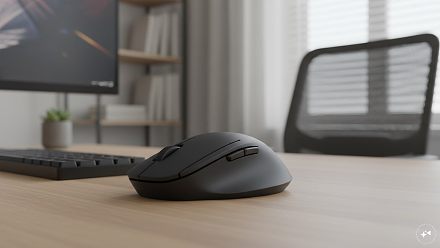
A wireless mouse is one of the easiest ways to make a laptop or desktop setup more comfortable. You get rid of the cable, have more freedom to move the mouse around and, in many cases, can use the same mouse with more th
लेखक Consumer Trends Desk··21K पढ़े गए
These Budget Wireless Mouse Are A Must Have For Office and Gaming
A wireless mouse is one of the easiest ways to make a laptop or desktop setup more comfortable. You get rid of the cable, have more freedom to move the mouse around and, in many cases, can use the same mouse with more than one device.
But the cheapest mouse is not necessarily the best choice. Someone working on spreadsheets all day has very different needs from someone who also plays games. Battery life, comfort, number of buttons, sensitivity and the type of wireless connection all matter.
We looked at seven affordable options, starting at just Rs 249. Most cost less than Rs 1,000, while the EvoFox Phantom Air sits slightly above the Rs 1,000 mark at the price shown at the time of writing.
Top picks
Best overall: Portronics Toad One
Best budget option: Zebronics Freego
Best for office use: Logitech M221
Best for gaming: Offbeat RIPJAW
Best for battery life: Logitech M186
Best affordable HP option: HP M120
Best for serious gaming: EvoFox Phantom Air
Quick comparison
Product
Price was
Price now
Discount
Best for
Portronics Toad One
Rs 1,499
Rs 699
53%
Best overall
HP M120
Rs 960
Rs 445
54%
Everyday office use
EvoFox Phantom Air
Rs 1,999
Rs 1,099
45%
Serious gaming
Offbeat RIPJAW
Rs 1,099
Rs 799
27%
Budget gaming
Logitech M186
Rs 1,190
Rs 595
50%
Battery life
Zebronics Freego
Rs 699
Rs 249
64%
Lowest price
Logitech M221
Rs 1,425
Rs 795
44%
Quiet office use
1. Portronics Toad One
Price: Was – Rs 1,499 | Now – Rs 699 | Discount: 53%
Why you should consider it
The Portronics Toad One is the strongest all-round choice here because it gives you more flexibility than a basic wireless mouse without becoming expensive.
It supports both Bluetooth and 2.4GHz wireless connectivity, so you can connect without a USB receiver on a Bluetooth device or use the supplied wireless connection when needed. It can connect with up to three devices, which is useful if you regularly move between a laptop, tablet and another device. Portronics also lists adjustable 1000, 1200 and 1600 DPI settings.
It has six buttons, RGB lighting and a rechargeable battery with USB-C charging. That means there are no disposable batteries to replace.
Pros: Bluetooth and 2.4GHz; rechargeable; six buttons; adjustable DPI; connects to three devices; RGB lighting.
Cons: More features than necessary if you only want a basic office mouse.
Best for: Anyone wanting one affordable mouse for work, general use and occasional gaming.
2. HP M120
Price: Was – Rs 960 | Now – Rs 445 | Discount: 54%
Why you should consider it
The HP M120 is a straightforward choice if you mainly need a wireless mouse for office work, browsing and everyday laptop use.
It connects through a 2.4GHz USB-A nano receiver and offers sensitivity of up to 1600 DPI. There are six buttons, giving you a little more control than a very basic three-button mouse.
The listing also mentions a 12-month battery life and a one-year warranty. At around Rs 445, it offers a useful middle ground between the cheapest models and more feature-heavy mice.
Pros: Affordable; six buttons; up to 1600 DPI; ergonomic shape; long claimed battery life.
Cons: No Bluetooth; uses a USB receiver rather than offering multiple connection options.
Best for: Everyday office and laptop use on a tight budget.
3. EvoFox Phantom Air
Price: Was – Rs 1,999 | Now – Rs 1,099 | Discount: 45%
Why you should consider it
The EvoFox Phantom Air is the gaming-focused option in this selection, although its current Rs 1,099 price puts it slightly above the Rs 1,000 budget.
It offers up to 12,800 DPI, a 1000Hz polling rate and six programmable buttons. In simple terms, this means you can make the mouse much more sensitive and customise its buttons for games.
It is also rechargeable and weighs 69g, making it considerably lighter than many traditional gaming mice. RGB lighting completes the gaming look.
Pros: High 12,800 DPI; rechargeable; lightweight; six programmable buttons; RGB lighting; tri-mode connectivity.
Cons: Slightly over Rs 1,000; unnecessary for basic office work.
Best for: Gamers willing to stretch the budget by around Rs 100.
4. Offbeat RIPJAW
Price: Was – Rs 1,099 | Now – Rs 799 | Discount: 27%
Why you should consider it
The Offbeat RIPJAW is worth considering if you want a gaming-style mouse while staying below Rs 1,000.
It has seven buttons and lets you switch between 1600, 2400 and 3200 DPI. This gives you more control over how quickly the pointer moves, which can be useful while gaming.
It is rechargeable, so you don’t have to keep buying batteries. The design is larger and more obviously gaming-oriented than something like the Logitech M186 or M221.
Cons: Bulky design may not appeal to office users; 2.4GHz connection rather than Bluetooth.
Best for: Budget gamers who want extra buttons and adjustable sensitivity.
5. Logitech M186
Price: Was – Rs 1,190 | Now – Rs 595 | Discount: 50%
Why you should consider it
If you simply want a familiar wireless mouse for everyday work, the Logitech M186 keeps things uncomplicated.
It connects using a USB mini receiver and offers 1000 DPI optical tracking. Its biggest attraction is battery life, with the listing claiming up to three years.
The ambidextrous shape also means it can be used comfortably with either hand. There aren’t lots of additional buttons or gaming features, but that is not necessarily a disadvantage for office use.
Pros: Simple to use; claimed three-year battery life; ambidextrous design; compact; established brand.
Cons: Only 1000 DPI; no Bluetooth; very few extra features.
Best for: Office users who prioritise simplicity and battery life.
6. Zebronics Freego
Price: Was – Rs 699 | Now – Rs 249 | Discount: 64%
Why you should consider it
At Rs 249, the Zebronics Freego is by far the cheapest mouse here. It is designed for someone who simply wants to replace a touchpad or wired mouse without spending much.
It uses a 2.4GHz wireless connection with a USB nano receiver and offers up to 3200 DPI. Zebronics also describes it as having a comfortable ergonomic design and a power-saving mode.
There is no Bluetooth or rechargeable battery, but at this price those omissions are understandable.
Pros: Extremely affordable; up to 3200 DPI; ergonomic design; power-saving mode.
Cons: No Bluetooth; basic feature set; not aimed at serious gaming.
Best for: Anyone wanting the cheapest practical wireless mouse.
7. Logitech M221
Price: Was – Rs 1,425 | Now – Rs 795 | Discount: 44%
Why you should consider it
The Logitech M221 is particularly suited to work environments because its main selling point is quiet clicking.
It uses a 2.4GHz USB receiver, has 1000 DPI optical tracking and offers a claimed battery life of up to 18 months. Its simple ambidextrous shape also makes it suitable for either hand.
At Rs 795, you are paying more than you would for several basic alternatives, but quiet buttons can be genuinely useful in an office, library or shared room.
Cons: Only 1000 DPI; no Bluetooth; limited gaming features.
Best for: Office users who want a quieter mouse.
How we chose
The mice were chosen by looking at the things that matter most at this price: comfort, wireless connectivity, battery type, sensitivity, number of buttons, suitability for office work and gaming, and overall value.
We also included different types of users rather than simply choosing seven similar mice. There are inexpensive models for everyday work, quieter options for offices, rechargeable mice and models with additional buttons and higher sensitivity for gaming.
What to check before you buy
Start by deciding how you will connect the mouse. A basic 2.4GHz mouse comes with a small USB receiver. It is simple and reliable, but it occupies a USB port. Bluetooth can be more convenient for laptops and tablets with limited ports.
Next, look at the battery. Some mice use replaceable batteries and can run for months or even years, while rechargeable models can simply be plugged in when the battery gets low.
DPI sounds complicated, but it essentially tells you how sensitive the mouse can be. For normal office work, you don’t need an extremely high figure. Higher and adjustable DPI becomes more useful for gaming or when you want greater control over pointer speed.
Finally, don’t assume that more buttons automatically make a mouse better. For Word, Excel and browsing, a simple comfortable mouse may be preferable. Extra buttons and very high sensitivity become more useful if gaming is part of the plan.
FAQs
1. Which is the best wireless mouse under Rs 1,000?
The Portronics Toad One is the strongest all-round option here. It offers Bluetooth and 2.4GHz connectivity, a rechargeable battery, adjustable DPI and six buttons while remaining comfortably below Rs 1,000 at the prices shown.
2. Which is the cheapest wireless mouse on this list?
The Zebronics Freego is the cheapest at Rs 249 in the supplied Amazon listing. It still offers 2.4GHz wireless connectivity and up to 3200 DPI.
3. Which wireless mouse is best for office work?
The Logitech M221 is a good choice for office use because of its quiet buttons and claimed 18-month battery life. The Logitech M186 is another good option if long battery life is the bigger priority.
4. Which mouse is best for gaming?
The EvoFox Phantom Air has the strongest gaming specifications here, including up to 12,800 DPI, a 1000Hz polling rate and six programmable buttons, but it costs Rs 1,099. If you want to remain strictly below Rs 1,000, the Offbeat RIPJAW is the better gaming pick.
Disclaimer: The product descriptions mentioned in the article are solely based on the primary and secondary research conducted by our experts. To keep you ahead of the curve with these latest products, News18 utilises affiliate links. This means if you decide to shop through our recommendations, we may earn a small referral commission at no extra cost to you. Please be advised that News18 is not responsible for any claims under the Consumer Protection Act, 2019, or other applicable laws regarding the final performance, quality, or safety of these products.