Portable SSD Vs External Hard Disk: Which Is Better For Under Rs 6,000 Budget?
Buying external storage under Rs 6,000 presents a fairly simple trade-off. You can spend the money on a smaller but much faster portable solid-state drive (SSD), or choose an external hard disk drive (HDD) that gives you
लेखक Consumer Trends Desk··24K पढ़े गए
Portable SSD Vs External Hard Disk: Which Is Better For Under Rs 6,000 Budget?
Buying external storage under Rs 6,000 presents a fairly simple trade-off. You can spend the money on a smaller but much faster portable solid-state drive (SSD), or choose an external hard disk drive (HDD) that gives you considerably more storage.
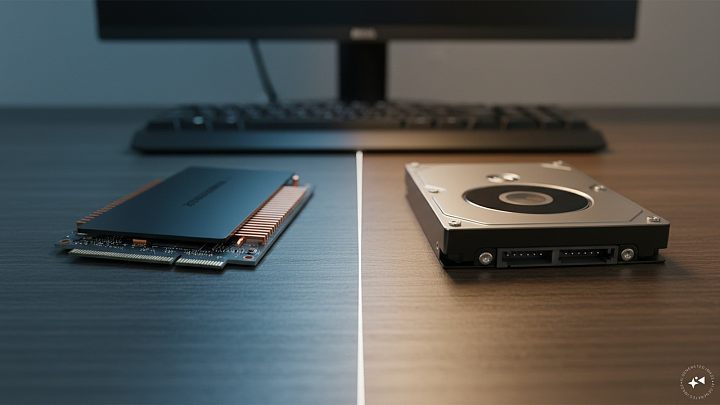
The difference comes down to how the two store data. An SSD uses flash memory and has no moving parts, while an HDD stores files on spinning magnetic disks. That makes SSDs faster, quieter and better suited to being carried around, while HDDs continue to make sense when affordable capacity is the priority.
So, which is better under Rs 6,000? For frequently moving files, everyday work and portability, the SSD has the advantage. If you primarily need somewhere inexpensive to keep lots of photos, videos and backups, an HDD can make more sense.
Which should you buy?
Buy a portable SSD if:
You regularly transfer large files.
You carry your drive between home, office or college.
You want faster access to stored files.
You work with photos, videos or other large projects.
You want a drive without delicate moving components.
Buy an external hard disk if:
Storage capacity matters more than transfer speed.
You mainly want a drive for backups.
You have a large collection of photos and videos.
The drive will usually remain on your desk.
You want more GB for your budget.
Top picks
1. EVM EnSave 256GB – Compact everyday storage
Price: Was – Rs 8,999 | Now – Rs 5,999 | Discount: 33%
2. KEXIN External SSD 256GB – Multi-device use
Price: Was – Rs 11,599 | Now – Rs 5,999 | Discount: 48%
3. UnionSine 500GB – Affordable extra capacity
Price: Was – Rs 4,599 | Now – Rs 3,299 | Discount: 28%
4. KINGSTER 500GB – Basic backup storage
Price: Was – Rs 3,900 | Now – Rs 3,199 | Discount: 18%
5. MAYUMI Trident 1TB – Maximum capacity under Rs 6,000
Price: Was – Rs 9,500 | Now – Rs 5,100 | Discount: 46%
Compared
Type
Product
Price was
Price now
Discount
Best for
Portable SSD
EVM EnSave 256G
Rs 8,999
Rs 5,999
33%
Compact everyday storage
Portable SSD
KEXIN External SSD 256GB
Rs 11,599
Rs 5,999
48%
Multi-device use
External HDD
UnionSine 500GB
Rs 4,599
Rs 3,299
28%
Affordable extra capacity
External HDD
KINGSTER 500GB
Rs 3,900
Rs 3,199
18%
Basic backup storage
External HDD
MAYUMI Trident 1TB
Rs 9,500
Rs 5,100
46%
Maximum capacity under Rs 6,000
Quick comparison
Feature
Portable SSD
External hard disk
Transfer speed
Much faster
Slower
Capacity for Rs 6,000
Usually lower
Usually higher
Moving parts
No
Yes
Resistance to knocks
Better
More vulnerable
Noise
Silent
May produce some operating nois
Size and weight
Usually smaller and lighter
Usually larger
Everyday portability
Excellent
Good, but needs more care
Large backups
Good, but expensive per GB
Excellent value
Working with large file
Better
Adequate
Best for
Speed and mobility
Capacity and backups
What does a portable SSD offer?
A portable SSD stores files on flash memory rather than a spinning disk. Its biggest practical advantage is speed. Even entry-level SSDs can substantially outperform conventional hard drives, although the actual transfer rate also depends on the drive, USB connection and device you plug it into.
That difference becomes noticeable when transferring large folders, high-resolution photographs or video. If you frequently move files between a laptop and external storage, an SSD can save considerable waiting time.
SSDs are also well suited to portable use because they don’t contain a spinning platter or mechanical read/write head. That makes them more resistant to the everyday bumps and movement that external storage may experience in a laptop bag.
Where portable SSDs perform best
An SSD makes the most sense when you regularly access or transfer the files stored on it. Photographers, video creators, students and professionals carrying work between computers can benefit from the additional speed.
Where portable SSDs struggle
Capacity is the obvious compromise at this price. The two portable SSDs here provide 256GB for Rs 5,999. If you have hundreds of gigabytes of videos and photos to archive, that space can disappear quickly.
What does an external hard disk offer?
An external HDD uses a conventional mechanical hard disk inside a portable enclosure. It isn’t as fast as an SSD, but its main strength is inexpensive capacity.
That remains the fundamental reason HDDs are relevant. Because hard drives are cheaper to produce per unit of storage, buyers can generally get substantially more capacity for the same budget.
Where external hard disks perform best
HDDs are particularly useful for keeping backups, photographs, downloaded movies and large collections of files that don’t need to be opened or transferred constantly.
Where external hard disks struggle
Speed and physical vulnerability are the compromises. HDDs contain moving components, which means they need to be treated more carefully, particularly while operating. SSDs are inherently better suited to shocks and movement because they don’t contain those mechanical components.
Which is faster?
The portable SSD wins comfortably.
Traditional external HDDs commonly operate at much lower transfer speeds than SSDs. Kingston notes that commercially available HDDs can reach around 160MB/s, while entry-level SSDs can exceed 500MB/s. Actual speeds vary considerably according to the drive and interface.
If you’re copying a few documents, the difference may not matter much. Move a large collection of photographs or a big video project and the SSD advantage becomes far easier to notice.
Which gives you more storage for Rs 6,000?
This round goes decisively to the external HDD.
Look at the options here: Rs 5,999 buys a 256GB EVM or KEXIN SSD, while Rs 5,100 buys a 1TB MAYUMI external HDD.
That makes an HDD attractive if your priority is simply fitting as many files as possible within a Rs 6,000 budget.
Which is better for travelling?
A portable SSD is the stronger choice.
SSDs are generally smaller and lighter and, more importantly, lack the moving mechanical parts found inside HDDs. This makes them more appropriate for storage that is frequently carried around.
An HDD can certainly travel with you, but it deserves more careful handling.
Common usage scenarios
Situation
Portable SSD
External HDD
Better choice
Moving large files frequently
Excellent
Average
SSD
Carrying storage every day
Excellent
Good
SSD
Photo/video work
Excellent
Good
SSD
Backing up a laptop
Good
Excellent
HDD
Storing a large media collection
Limited at this budget
Excellent
HDD
Getting maximum capacity under Rs 6,000
Poorer
Excellent
HDD
Keeping documents and work files handy
Excellent
Good
SSD
Drive mostly stays on a desk
Good
Excellent
HDD
So, which should you choose?
For most buyers who want fast portable storage, an SSD is the better technology. It is faster, compact, silent and more resistant to the bumps associated with daily portable use.
But the Rs 6,000 budget changes the equation. If you need 1TB of storage rather than 256GB, an external HDD provides much better capacity for the money. Current guidance on external storage still points to this basic split: SSD for speed and frequent use, HDD for inexpensive bulk storage.
In simple terms, buy the portable SSD if you will work from the drive; buy the external HDD if you mainly want to store things on it.
FAQs
1. Is a portable SSD better than an external HDD?
It is better for speed, portability and resistance to physical shocks. An HDD is better when getting more storage for your money is the priority.
2. Is 256GB enough for a portable SSD?
It can be enough for documents, work files and a modest collection of photos. For large video libraries, games or full-computer backups, you may quickly need more capacity.
3. Is a 1TB HDD better than a 256GB SSD?
It depends on your needs. Choose 1TB HDD storage if capacity and backups matter most. Choose the 256GB SSD if fast transfers and portability matter more.
4. Can I use an external SSD with a phone?
Some portable SSDs can work with compatible smartphones, provided the phone supports external USB storage and you have the correct connection. Always check compatibility before buying.
5. Can an SSD or HDD be used as my only backup?
It is safer not to rely on any single drive for important data. Keep another copy of files you cannot afford to lose.
6. Does an SSD last longer than an HDD?
They fail in different ways, so lifespan cannot be reduced to one simple rule. SSDs have no moving mechanical parts and are more resistant to physical shocks, while both SSDs and HDDs can eventually fail.
Disclaimer: The product descriptions mentioned in the article are solely based on the primary and secondary research conducted by our experts. To keep you ahead of the curve with these latest products, News18 utilises affiliate links. This means if you decide to shop through our recommendations, we may earn a small referral commission at no extra cost to you. Please be advised that News18 is not responsible for any claims under the Consumer Protection Act, 2019, or other applicable laws regarding the final performance, quality, or safety of these products.