10 ChatGPT Prompts To Turn Your Kids’ Photos Into Adorable Krishna-Themed Pictures- Janmashtami 2026
Janmashtami 2026 is almost here, and parents looking for a fun way to create festive pictures of their children can use ChatGPT to give ordinary photos a traditional Krishna-themed makeover. From a little Krishna sitting
लेखक Ayush Mukherjee··16K पढ़े गए
10 ChatGPT Prompts To Turn Your Kids’ Photos Into Adorable Krishna-Themed Pictures- Janmashtami 2026
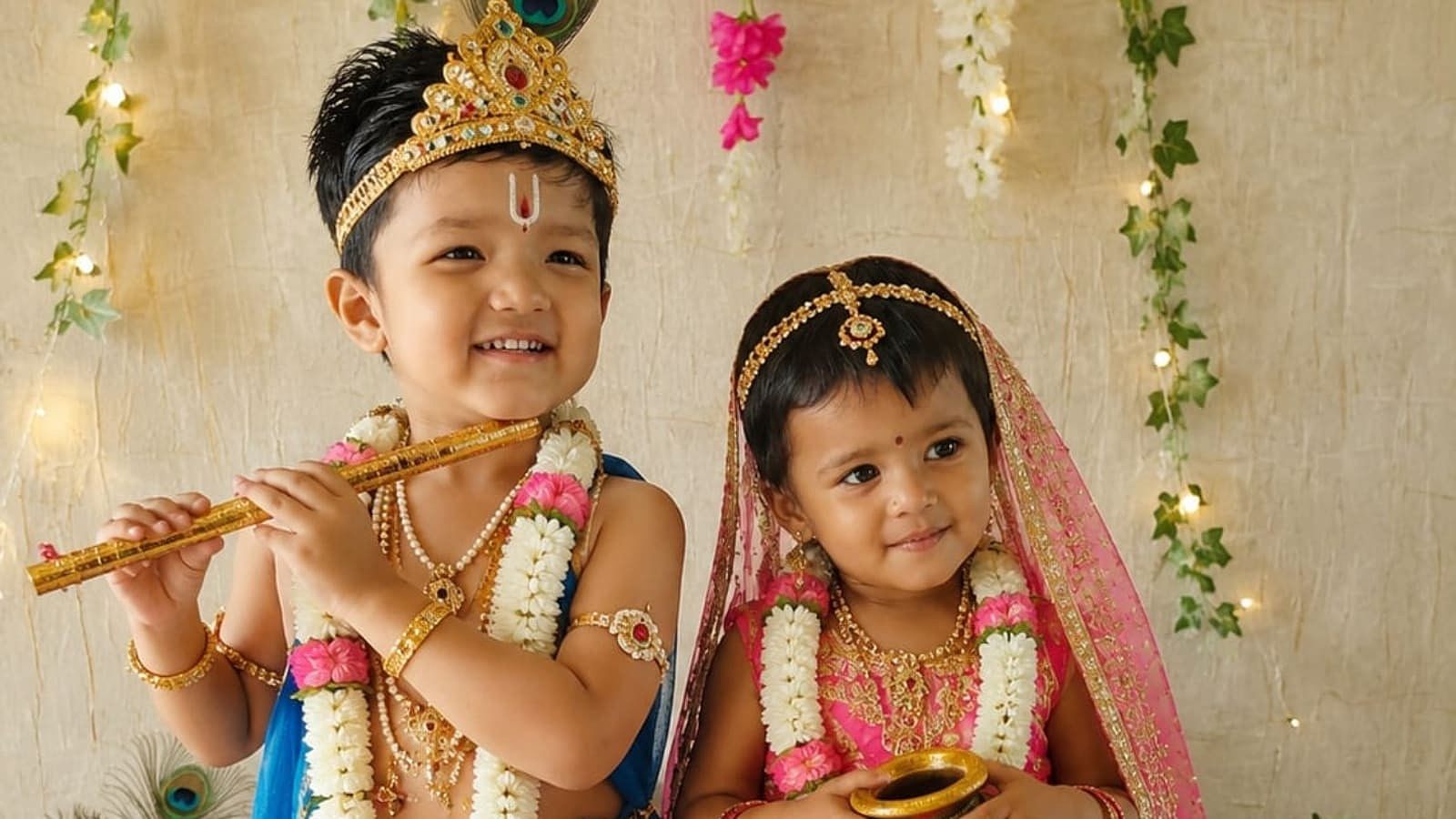
Janmashtami 2026 is almost here, and parents looking for a fun way to create festive pictures of their children can use ChatGPT to give ordinary photos a traditional Krishna-themed makeover. From a little Krishna sitting beside a matki to a colourful Vrindavan-inspired portrait, the right prompt can transform a regular photograph into a festive image.
Krishna Janmashtami will be celebrated on September 4, 2026, in India. Dahi Handi will follow on September 5.
ChatGPT can create new images from text prompts and can also edit an existing uploaded photograph. OpenAI recommends being clear about the subject, setting, lighting, composition and the changes you want to make.
That makes it possible to create personalised Janmashtami pictures without needing complicated photo-editing software. If you have a favourite picture of your child, you can upload it to ChatGPT and use one of the prompts below.
How To Create Janmashtami Photos Of Kids Using ChatGPT
Start by uploading a clear photo of your child to ChatGPT. A front-facing or well-lit picture generally makes it easier to preserve the child’s appearance while changing the surroundings, clothes and theme.
Then paste one of the prompts below. You can also customise details such as the child’s outfit, background, jewellery, props and lighting.
For the most natural result, include instructions such as “keep the child’s face, facial features and expression unchanged”. You can also tell ChatGPT not to add unnecessary people, text, logos or extra objects.
1. Little Krishna Portrait
Prompt:
“Transform this child’s photo into a beautiful Janmashtami-themed portrait. Keep the child’s face, facial features, skin tone and natural expression unchanged. Dress the child as little Krishna in a traditional yellow dhoti, delicate jewellery and a peacock feather crown. Add a small flute and a traditional Indian festive background with soft golden lighting, flowers and subtle decorations. Make the image warm, joyful and elegant, with realistic details.”
2. Cute Krishna With Matki
Prompt:
“Edit this photo into a cute little Krishna Janmashtami scene. Keep the child’s identity and facial features exactly as they are. Dress the child in a yellow dhoti with a peacock feather crown and place the child beside a decorated clay matki filled with butter. Add marigold flowers, traditional decorations and warm festive lighting. Create a charming, high-quality family photograph.”
3. Vrindavan-Inspired Janmashtami Photo
Prompt:
“Turn this child’s photograph into a dreamy Janmashtami portrait inspired by traditional Vrindavan. Preserve the child’s face and natural appearance. Dress the child as Bal Krishna with a yellow dhoti, peacock feather crown and small flute. Create a beautiful background with trees, flowers, traditional lamps and a peaceful Indian village atmosphere. Use soft morning light and realistic photography.”
4. Krishna Playing The Flute
Prompt:
“Use this child’s photo to create a festive Krishna-themed portrait. Keep the child’s face and identity unchanged. Dress the child in traditional Krishna attire and show the child holding a small flute. Add a peacock feather, floral decorations and a soft glowing background inspired by Janmashtami celebrations. Keep the pose natural and the image suitable for a family photo.”
5. Janmashtami Photo With A Decorated Swing
Prompt:
“Transform this photo into a traditional Janmashtami celebration scene. Keep the child’s face, expression and facial features unchanged. Dress the child as little Krishna and place the child beside a beautifully decorated Krishna swing with flowers, lights and traditional Indian decorations. Use warm golden lighting and a festive but elegant background. Make it look like a professionally photographed family portrait.”
6. Baby Krishna-Style Festive Portrait
Prompt:
“Create a sweet and traditional Janmashtami portrait using this child’s photograph. Preserve the child’s real facial features and natural expression. Add a simple yellow traditional outfit, a small peacock feather crown and a tiny flute. Surround the child with flowers, diyas and subtle festive decorations. Keep the composition soft, innocent and age-appropriate, like a professional children’s festival photoshoot.”
7. Krishna And Radha-Themed Kids Photo
Prompt:
“Create a Janmashtami-themed portrait using the uploaded children’s photo. Preserve each child’s face and identity. Dress one child in traditional Krishna attire with a peacock feather crown and another in a traditional Radha-inspired festive outfit. Add flowers, diyas, a decorated backdrop and soft golden lighting. Keep the children looking natural and happy, with an authentic Indian festive atmosphere.”
8. Traditional Indian Janmashtami Photoshoot
Prompt:
“Turn this ordinary child photograph into a professional Janmashtami photoshoot. Keep the child’s face, facial features and expression unchanged. Dress the child in a traditional Krishna-inspired outfit with a peacock feather accessory. Add marigold garlands, clay pots, flowers and warm festive lights in the background. Use realistic photography, natural skin texture and soft cinematic lighting.”
9. Cute Dahi Handi Theme
Prompt:
“Edit this child’s photo into a colourful Janmashtami Dahi Handi celebration. Preserve the child’s real face and identity. Dress the child in a traditional Krishna-inspired outfit and create a festive background with decorated matkis, flowers, colourful fabric and traditional Indian decorations. Keep the child as the main focus and make the image cheerful, realistic and suitable for sharing with family.”
10. Magical Janmashtami Night Portrait
Prompt:
“Transform this child’s photo into a magical Janmashtami night portrait. Keep the child’s facial features, identity and expression unchanged. Dress the child as little Krishna with a yellow dhoti, peacock feather crown and small flute. Create a beautiful night-time setting with glowing diyas, flowers, soft fairy lights and a subtle moonlit background. Make it look like a premium professional festival photograph while keeping the child natural and recognisable.”
One Extra Prompt To Make The Result Look More Real
If the first image looks too artificial, parents can ask ChatGPT to refine it rather than starting again. Try this:
“Make this image look more like a professionally photographed real family portrait. Keep the child’s original facial features and identity unchanged. Reduce artificial-looking skin, excessive smoothing and unrealistic details. Keep the Krishna-inspired clothing and Janmashtami decorations, but make the lighting, shadows, textures and proportions look natural.”
How To Get Better Results From ChatGPT
The quality of the original photograph matters. Try using a clear image where the child’s face is visible and there are no objects covering the eyes or face. If you want the child’s face to remain recognisable, explicitly tell ChatGPT not to alter facial features.
You can also add specific instructions depending on the result you want. For example, add “vertical portrait, suitable for Instagram” for a social media post, or “high-resolution family portrait” if you want a more polished look.
OpenAI’s own guidance says prompts work best when they clearly describe the subject, what is happening, the setting and the desired visual style. It also recommends specifying constraints when certain elements should remain unchanged.
Parents Should Be Careful When Uploading Kids’ Photos
There is one important point to remember before experimenting with AI-generated children’s pictures: use photographs you have the right to upload and avoid sharing unnecessary personal information along with them.
For a simple Janmashtami edit, there is no need to provide a child’s name, school, home address, phone number or other identifying details. Parents should also think carefully before publicly sharing AI-generated pictures of children, particularly if the image contains information about where the child lives, studies or spends time.
It is also worth remembering that an AI-generated picture is an edited or synthetic representation. If the image is shared online, particularly in a news, commercial or public context, it should not be presented as an actual photograph of an event that never happened.