Samsung Galaxy Tab S12+ 5G First Impressions: The Plus Is Back, But What’s Changed?
Samsung’s tablet lineup works on a rotation, and this year, the Plus model is back after a one-year absence. The Galaxy Tab S12+ arrives two years after the Tab S10+, with no regular Tab S12 alongside it. Priced at Rs 1,
Ni Ijaj Khan··21K nabasa
Samsung Galaxy Tab S12+ 5G First Impressions: The Plus Is Back, But What’s Changed?
Samsung’s tablet lineup works on a rotation, and this year, the Plus model is back after a one-year absence. The Galaxy Tab S12+ arrives two years after the Tab S10+, with no regular Tab S12 alongside it. Priced at Rs 1,29,999, it targets users who want a large-screen tablet for work and entertainment without stepping up to the 14.6-inch Ultra.
The changes are less about reinventing the tablet and more about refining what was already there. You get a 12.6-inch 120Hz Dynamic AMOLED 2X display, a newer MediaTek Dimensity 9500 processor and a larger 10,600mAh battery, all packed into a thinner, lighter body. Samsung also includes the S Pen and retains DeX for those who want a more desktop-like experience.
I spent some time with the new tablet to explore its design, display, performance and software, and see what has changed since Samsung’s last Plus model.
Samsung Galaxy Tab S12+ 5G: Price In India
The Galaxy Tab S12+ starts at Rs 1,29,999 for the 12GB RAM and 256GB storage variant, while the 12GB RAM and 512GB storage model is priced at Rs 1,49,999.
Samsung Galaxy Tab S12+ 5G First Impression: Design, Display And Audio
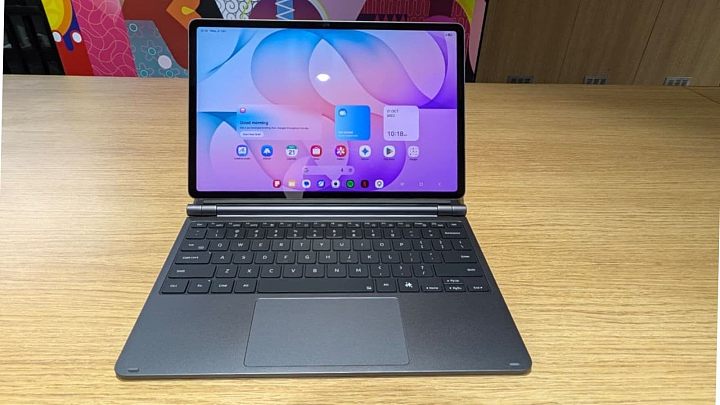
The first thing that stands out about the Samsung Galaxy Tab S12+ is how much screen Samsung has managed to fit into a body that remains remarkably slim. At 5.3mm, it is thinner than its predecessor, the Galaxy Tab S10+, and at 553 grams, it is also lighter. What makes this more interesting is that Samsung has increased both the display size and battery capacity without making the tablet bulkier. The Tab comes in two colour options – Grey and Silver and I got the first one for the review, which looks understated and well put together. The rear panel is equally restrained, with a single camera and a finish that keeps the design free of unnecessary visual clutter.
There is also a clear productivity angle to the Tab S12+. Samsung’s DeX interface turns the tablet into something closer to a desktop workspace, particularly when paired with an optional keyboard. That could make it a useful alternative to carrying a laptop for lighter office work, writing and multitasking. I wouldn’t call it a laptop replacement just yet, though; that depends as much on your software and workflow as it does on the hardware.
One feature I’m glad to see here is IP68 certification. Water and dust resistance is still not something I take for granted on a premium tablet, especially one designed to move between a desk, a bag and different working environments. Samsung claims the device can handle freshwater immersion at depths of up to 1.5 metres for 30 minutes. The bundled S Pen has the same rating, too. It’s not the sort of feature that changes how the tablet looks or feels in your hands, but it does make the device a little less precious to use.
Display
A tablet’s display has to do more than look good in a product photograph, and the Tab S12+ has the specifications to make a strong first impression. It gets a 12.6-inch Dynamic AMOLED 2X panel with a resolution of 2,800 x 1,752 pixels and a 120Hz refresh rate. The larger screen and reduced bezels give it a more spacious feel, although the borders around the panel are still visible. Personally, I don’t mind that. On a tablet this size, a little space around the screen is useful when holding it in landscape mode, particularly when you’re reading or watching something.
Furthermore, it has a peak brightness at 1,600 nits, with High Brightness Mode reaching 1,000 nits. On paper, that should give the display enough headroom for a range of viewing conditions, while the AMOLED panel is well suited to films, photos and other content where contrast matters. The 120Hz refresh rate should also help keep scrolling and navigation feeling fluid. These are encouraging specifications, but brightness figures alone don’t tell the whole story. How well the screen handles reflections and maintains visibility outdoors is something that will need a closer look during a longer test.
Audio
Samsung has made an upgrade to the audio system as well, with its four speakers now supporting four-channel spatial audio. According to the company, that doubles the number of spatial audio channels supported by the previous generation.
It might not sound like the biggest upgrade on a specification sheet, but I’d argue that speakers matter more on a tablet than they do on most other mobile devices. The larger screen naturally lends itself to watching shows, catching up on YouTube, joining video meetings and attending online classes. Using headphones for all of that isn’t always practical, particularly when the tablet is being shared or used at a desk.
The real concern is whether the updated setup makes audio feel more spacious and gives dialogue enough clarity without requiring you to turn up the volume. More channels don’t automatically guarantee better sound, so I’d want to hear the speakers in action before drawing any conclusions. For now, the upgrade looks relevant to how people actually use a tablet, and that makes it worth paying attention to.
Samsung Galaxy Tab S12+ 5G First Impression: Performance, Software And AI
A premium tablet needs to do more than open apps quickly. It should handle the sort of workload that makes a larger screen worthwhile, and the Galaxy Tab S12+ seems well equipped for that. It is powered by MediaTek’s 3nm Dimensity 9500 processor, paired with 12GB of RAM and 256GB or 512GB of storage. There’s also a microSD card slot supporting up to 2TB, which is welcome news for anyone who would rather expand storage than pay for a higher-capacity variant.
During my initial hands-on, the tablet had no trouble keeping up with everyday multitasking. I could switch between apps, arrange three of them on screen and spend some time gaming without noticeable stutters. Samsung has also redesigned the cooling system, replacing the flat vapour chamber with a 3D design that it says moves heat away more efficiently. DeX also handled a busy desktop-style layout without any obvious slowdown. These early results are encouraging, but longer gaming sessions and demanding workloads will tell us more about heat management and sustained performance.
Software And AI
The hardware is only part of the appeal. The Tab S12+ runs on One UI 9 based on Android 17, which makes a stronger case for its large display through the way it handles multiple tasks. You can keep a video, Google Doc and Gemini open together, which could be particularly handy when studying or researching. Note Assist adds the option to condense lengthy notes, saving you from scrolling through pages of material.
Creative users have another reason to pay attention. Adobe Photoshop arrives on an Android tablet for the first time, with at least six months of Galaxy Store exclusivity. Samsung is also bundling apps such as Goodnotes, Notability, Clip Studio Paint, LumaFusion and Notion, alongside introductory subscription offers.
The AI additions go beyond summarising text. Creative Studio uses Google’s Nano Banana model to turn S Pen sketches into images and create stickers and invitations. Now Nudge suggests actions based on what’s on screen, while users can choose Bixby, Gemini or Perplexity as their assistant. A six-month Google AI Pro trial is included.
DeX, with up to four workspaces, ties the experience together when a keyboard is attached.
My early takeaway is that Samsung is betting on what you can do with this tablet, rather than just how quickly it runs. Whether its software and AI features prove genuinely useful beyond a demonstration is something the full review will need to tell.
Galaxy Tab S12+ 5G: Battery And Charging
The Galaxy Tab S12+ packs a 10,600mAh battery, with Samsung claiming up to 21 hours of video playback on a full charge. It supports 45W fast charging, and the company estimates a full charge takes around 95 minutes with a compatible adapter. I’ll put those claims to the test in my full review.