Paper Jams, Dried Ink, Driver Hunts: What Owning A Home Printer Is Really Like
Buying a home printer feels simple until you own one. The first time it jams on an urgent assignment, refuses to print after two weeks of rest, or your new laptop cannot find it, you realise the printer you pick matters
Ni Consumer Trends Desk··19K nabasa
Paper Jams, Dried Ink, Driver Hunts: What Owning A Home Printer Is Really Like
Buying a home printer feels simple until you own one. The first time it jams on an urgent assignment, refuses to print after two weeks of rest, or your new laptop cannot find it, you realise the printer you pick matters more than the price on the box.
Most of these problems can be avoided by choosing the right type of printer for how often you print. Here are five printers from Canon, HP and Epson, starting at Rs. 9,985, and the everyday headaches each one avoids. Every pick is in stock on Amazon and rated 4 stars or higher.
1. Canon PIXMA MegaTank G1010 (Print Only)
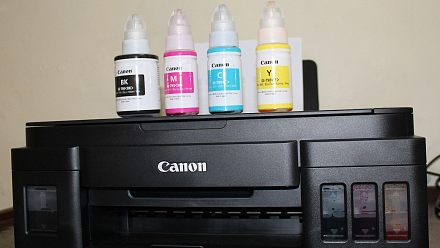
The Canon G1010 is the most affordable printer here at Rs. 9,985 and the simplest to own. It prints only, in colour and black, over a USB cable, so there is no Wi-Fi setup or app to troubleshoot. Canon quotes a very low cost per page, which makes it good for students who print notes regularly. The catch is compatibility: it works with Windows, but Canon says it is not compatible with macOS, and there is no display on the printer. It is rated 4.2 stars by over 1,000 buyers. Check the Canon PIXMA G1010 deal on Amazon.
2. HP Smart Tank 583 All-in-One (Wi-Fi)
The HP Smart Tank 583 avoids the classic driver hunt. It connects over Wi-Fi and is set up through the HP Smart app on your phone or laptop, so you can print from any device in the house without installing drivers from a CD. It prints, scans and copies, supports borderless photo printing, and HP says the ink in the box lasts up to 4,000 black pages. It costs Rs. 11,299 and is the most reviewed printer here, rated 4 stars by over 3,500 buyers. See the HP Smart Tank 583 offer on Amazon.
3. Canon PIXMA MegaTank G3010 All-in-One (Wi-Fi)
The Canon G3010 is a dependable all-rounder for families. It prints, scans and copies over Wi-Fi, and Canon says the ink in the box prints up to 6,000 black and 7,000 colour pages, which means fewer refills in the first year. Free installation is included, so someone sets it up for you. Like all ink tank printers, it works best when used every week, so the ink does not dry in the print head. It costs Rs. 11,999 and is rated 4.2 stars by over 800 buyers. Grab the Canon PIXMA G3010 deal here.
4. HP Laser 1008w (Monochrome, Wi-Fi Direct)
If dried ink is your biggest worry, a laser printer solves it. The HP Laser 1008w uses toner powder instead of liquid ink, so it can sit unused for weeks and still print the first page perfectly. It prints in black and white at up to 21 pages per minute, has a 150-sheet input tray and connects over Wi-Fi Direct. It suits homes that print forms, documents and assignments rather than photos. It costs Rs. 12,799 and is rated 4 stars by over 700 buyers. View the HP Laser 1008w price on Amazon.
5. Epson EcoTank L3211 All-in-One
The Epson L3211 uses Epson’s Heat-Free technology, which uses less power and has fewer parts that wear out, and spill-free refilling keeps ink off your hands. It prints, scans and copies in colour with a low running cost, and its compact design fits on a small study table. It connects over USB, so it is best placed next to the computer you print from most. It costs Rs. 13,999 and is rated 4 stars by over 2,400 buyers. Stock was low when we checked. Check the Epson EcoTank L3211 deal on Amazon.
Price comparison
Printer
Type
Connection
Price
Canon PIXMA G1010
Ink tank, print only
USB
Rs. 9,985
HP Smart Tank 583
Ink tank, all-in-one
Wi-Fi
Rs. 11,299
Canon PIXMA G3010
Ink tank, all-in-one
Wi-Fi
Rs. 11,999
HP Laser 1008w
Mono laser
Wi-Fi Direct
Rs. 12,799
Epson EcoTank L3211
Ink tank, all-in-one
USB
Rs. 13,999
How to avoid the three most common printer headaches
Paper jams usually come from damp, curled or overfilled paper. Store paper in a dry place, fan the stack before loading and never fill the tray past its line.
Dried ink happens when an ink tank printer sits unused for weeks. Print a page every few days, or pick a laser printer if you print rarely. If prints come out streaky, run the head cleaning option once before calling service.
Driver trouble is easiest to avoid with a Wi-Fi printer that sets up through the brand’s app. Download drivers only from the brand’s official website, and check Mac compatibility before you buy.
Tips before you buy
Match the printer to your habits. Print weekly? Ink tank. Print rarely and only text? Laser.
Use genuine ink or toner. Cheaper refills can clog print heads and affect warranty.
Check your laptop. Confirm Windows or Mac support on the product page.
Keep spare paper dry. Humidity is a common cause of jams during the monsoon.
Stack bank offers. Check the product page for bank discounts.
Prices and offers on Amazon change often during the sale, so check the live price before you buy.