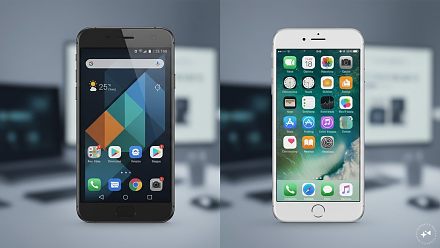
iPhone or Android in 2026: Forget the Specs - Which Is Better to Actually Live With?
I have spent enough time moving between iPhones and Android phones to have developed a slightly complicated relationship with both. On the Android side, I have used phones from Samsung, ASUS, Nothing and Vivo.
Ni Anjan N Ghosh··47K nabasa
iPhone or Android in 2026: Forget the Specs - Which Is Better to Actually Live With?
I have spent enough time moving between iPhones and Android phones to have developed a slightly complicated relationship with both. On the Android side, I have used phones from Samsung, ASUS, Nothing and Vivo.
My iPhone journey has been even longer – from the SE and XR through the 11, 12 and every generation that followed, including the regular and Pro models of the 16 and 17, right up to the iPhone Air I use today.
After all that, I have reached one deeply technical conclusion: both can be bloody annoying. They are also both brilliant.
And that is why I find most phone comparisons rather pointless. One has more RAM, another has a faster processor, this one has four cameras, that one scores some enormous number in a benchmark test. Wonderful. But what happens on a Monday morning when I’m trying to find a file someone sent me last week? Or when I want to go back one screen? Or clear twenty useless notifications? Or simply move something where I want it? That’s the comparison I’m interested in.
The iPhone: Beautifully Simple… Until Apple Says No
There is a lot I love about using an iPhone. AirDrop is one of those things. If someone nearby has an Apple device, sending a photograph or file is almost ridiculously easy. Tap, send, done. No cables, no WhatsApp compression, no emailing a photograph to someone sitting three feet away.
Then there is the way Apple’s devices work together. Copy something on the iPhone and paste it on the Mac. Notes appear everywhere. The hotspot is there when you need it. Start doing something on one device and continue on another. Apple has several names for these features. I just call them very convenient.
Face ID is another feature I barely think about anymore, which is probably the biggest compliment I can give it. I look at the phone and it works. Banking apps, passwords, purchases – done. Apps also tend to feel polished, animations are smooth and everything generally feels like it belongs together.
Everything is lovely until you want to do something Apple doesn’t particularly want you to do.
File management has improved, but compared with the freedom I’m used to elsewhere, I can still find it unnecessarily restrictive. Sometimes I just want to find a file, move it somewhere and get on with my life. I don’t want my phone behaving like a hotel receptionist asking which room I’m visiting and why.
The home screen is far more flexible than it once was, but Apple still tends to give you freedom rather carefully – rather like a parent handing the car keys to a teenager.
Notifications are another irritation. Android simply handles them better for me. When several apps have been busy all day, I find dealing with the resulting mess much easier there.
And then there is Back. This sounds ridiculously small until you use your phone hundreds of times a day. On Android, going back feels natural and predictable. On an iPhone, what happens can depend on the app and where you are inside it. Sometimes I swipe. Sometimes I look for something at the top-left corner. Apple has built a phone that can recognise my face, understand what I’m looking at and perform some astonishing computing tricks. Can I please just go back?
Apple has opened iOS considerably over the years. You can now choose different default apps for several everyday jobs, so saying Apple completely forces you to use its own apps would no longer be fair. But I still feel Android gives me more freedom over how I want my phone to behave.
Android: Here Are the Keys. Try Not to Get Lost.
This is where Android becomes fun. I can change launchers, icons, colours, widgets and layouts. I can arrange things the way I want them arranged rather than the way somebody in a design meeting decided I should.
The choice of phones is another attraction. You can find conventional phones, gaming phones, camera-focused phones, foldables and all sorts of experiments in between. Different manufacturers take different approaches to cameras, charging, screens and design. Sometimes the experiments are brilliant. Sometimes you wonder who approved them. But at least somebody is experimenting.
AI is becoming genuinely useful too. I particularly like what Google is doing with Gemini because it can understand what’s on my screen and help with what I’m already doing. I don’t need to know what kind of AI model is running underneath or how many billion whatever-it-has. If it saves me a few steps, I’m interested.
The keyboard and voice typing are excellent. Multitasking is genuinely useful. Split screen isn’t something I need every hour, but when I want information from one app while doing something in another, I’m glad it’s there. And notifications? Thank you, Android.
But freedom has a price. Settings can sometimes feel as though they were organised by five people who weren’t allowed to speak to each other. I know the setting exists. The phone knows the setting exists. We now begin our little treasure hunt.
Another problem is consistency. Android runs on a huge variety of phones with different screens, cameras and hardware. That choice is one of its greatest strengths, but it also means an app that behaves beautifully on one phone may not feel quite as polished on another. I’ve also found that the experience inside some third-party camera apps isn’t always as consistent as I’d like.
Battery-saving systems can occasionally become a little too enthusiastic as well. Saving my battery is appreciated. Deciding in the background that an app I actually wanted running should take an afternoon nap is less helpful.
Software updates used to be an easy argument in Apple’s favour, but that old assumption needs updating too. Google now provides seven years of updates for Pixel 8 and later phones, while Samsung introduced seven years of support with the Galaxy S24 series and has continued the policy with newer flagship models. Android is still a very large world, though, so the length of support depends on the phone and manufacturer you choose.
So Which One Is Better?
I’m not sure that’s even the right question anymore. The better question might be: which one annoys you less?
If you like things simple and polished, and especially if you already use other Apple devices, an iPhone can be wonderfully easy to live with. If you enjoy changing things, want more control, prefer Android’s approach to notifications and multitasking, or simply enjoy having a huge choice of different phones, Android can be equally satisfying.
Neither approach is right for everyone. I can love AirDrop and still curse iPhone file management. I can enjoy Android’s freedom and still wonder why a setting I used yesterday has apparently entered the Witness Protection Programme.
And that’s what specifications never tell you.
A smartphone isn’t something most of us use for ten minutes and put away. It wakes us up, takes our photographs, shows us directions, handles our payments, carries our tickets, entertains us while we’re waiting somewhere and, unfortunately, allows office WhatsApp groups to find us at all hours. You have to live with it.
So forget which phone has the faster processor for a moment. Forget which company had the louder launch event. And definitely don’t choose one because somebody on the internet declared a winner. Choose the one whose way of doing things feels more like your way of doing things. You’ll probably be happier.
Whichever one you choose, don’t worry. It will eventually find some way to annoy you.