iOS 27 Update On My iPhone Air: Siri Finally Went Back to School
I installed iOS 27 on my iPhone Air expecting the usual annual ritual – some visual changes, a few new features I’ll probably forget about in a week and Apple’s assurance that everything is now more intelligent.
Ni Anjan N Ghosh··38K nabasa
iOS 27 Update On My iPhone Air: Siri Finally Went Back to School
I installed iOS 27 on my iPhone Air expecting the usual annual ritual – some visual changes, a few new features I’ll probably forget about in a week and Apple’s assurance that everything is now more intelligent.
This time, though, there’s one rather large difference.
Siri appears to have gone back to school.
And after years of asking Siri perfectly reasonable questions only to be rewarded with “Here’s what I found on the web”, I’d say the education was slightly overdue.
Siri is finally the main attraction
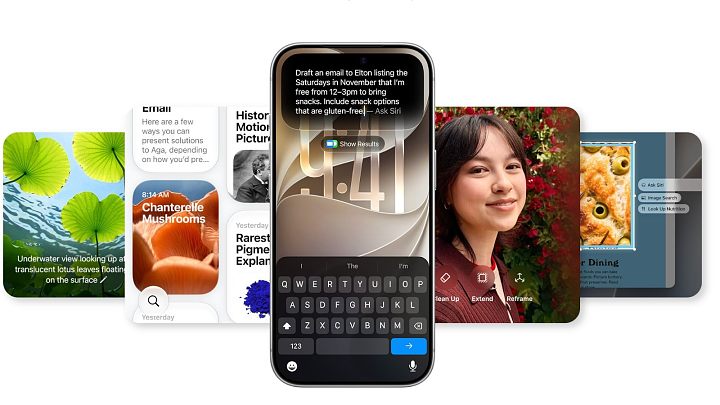
The biggest change is the new Siri AI. It now gets its own app and Apple says it can understand what’s on your screen, use personal context and have proper back-and-forth conversations. You can even return to an earlier conversation rather than starting again from scratch.
My early impression? This is much closer to what I always expected Siri to become.
But I’m deliberately saying early impression. Siri AI is still in beta and some of its most interesting abilities depend on understanding your personal information over time. I’m certainly not going to declare Siri a genius after spending a few hours with it. We’ve known each other for too long for trust to be rebuilt that quickly.
Visual Intelligence is more interesting than I expected
This is probably one of the features I’ll actually use. Siri mode in Camera can analyze what you’re looking at, while screenshots can now become a starting point for asking questions or finding similar things. Apple even suggests using the camera to get nutritional information from your dinner or help split a restaurant bill.
I’m less interested in interrogating my butter chicken about its nutritional history. Some things are better left unknown.
But being able to point the camera at something or ask about whatever is already on my screen feels genuinely useful.
Photos gets some clever tricks
Being an amateur photographer, I naturally headed towards Photos. Spatial Reframing can change the framing after you’ve taken a picture, Extend can expand a shot and Clean Up can remove larger unwanted objects.
These are fun to experiment with, and Clean Up in particular could save quite a few photographs ruined by somebody wandering into the frame at exactly the wrong moment.
Whether these tools consistently produce results I’d actually keep is another matter. Photo editing is one area where five impressive demonstrations tell me much less than using it on hundreds of real photographs. I’ll come back to this after I’ve lived with it.
Liquid Glass looks better
Apple has also refined Liquid Glass, with better contrast and readability, and there’s now a slider to decide how clear or tinted you want it.
I like having the choice. Apple doesn’t always have a long history of saying, “Here’s the design – adjust it yourself.”
Maybe they’re mellowing with age.
Some of the cleverest features need more time
Call Context sounds particularly useful. When you’re calling a business, iOS can surface relevant information from your apps – an airline confirmation number or hotel reservation from Mail, for example. Importantly, Apple says it uses the number you’re calling, not the conversation itself, to find that information.
Safari can also organize tabs by topic and notify you when webpages change, including things like price drops.
Both sound good. Neither is something I’m prepared to review properly after a short test. These are features that have to quietly work in the background for a few weeks before you discover whether they’re genuinely helpful or simply features Apple demonstrated beautifully on stage.
And what about India?
This is where I’ll reserve judgement.
Siri AI starts in English, although Apple Intelligence itself supports a much wider range of languages. Apple also warns that some features won’t be available in every region, language or device.
India is a particularly interesting test. A perfectly normal conversation here can begin in English, switch to Hindi halfway through and end with the name of a restaurant that Siri has absolutely no idea how I pronounce.
Let’s see how intelligent the intelligence really is.
There’s another small detail worth watching. Apple says some server-based AI features have daily usage limits, and expanded access will eventually be available for a fee.
Ah. There it is.
I was wondering when the subscription department would arrive.
My Take
After my first look, iOS 27 feels more interesting than the usual annual collection of cosmetic changes and features I’ll use twice.
Siri AI is clearly the headline act, Visual Intelligence has real potential, the photo tools are fun and Liquid Glass feels more mature. But I’m not ready to give some of the cleverer features a verdict yet {Cleverer? Is that even a word or should it be more clever}. Things like personal context, Call Context, Safari intelligence and even Siri itself need days or weeks of normal use before I’ll know whether they’re actually making my iPhone Air better.
For now, iOS 27 looks promising.
And Siri? Let’s just say the report card has improved.