Earbuds And Headphone Cleaning Tips: How To Remove Earwax, Dust And Sweat Without Damaging Them
Earbuds and headphones have become everyday gadgets for music, calls, podcasts, gaming and watching videos. But because earbuds sit inside or close to the ear, they can quickly collect earwax, sweat, skin oil, dust and l
Ni Ayush Mukherjee··39K nabasa
Earbuds And Headphone Cleaning Tips: How To Remove Earwax, Dust And Sweat Without Damaging Them
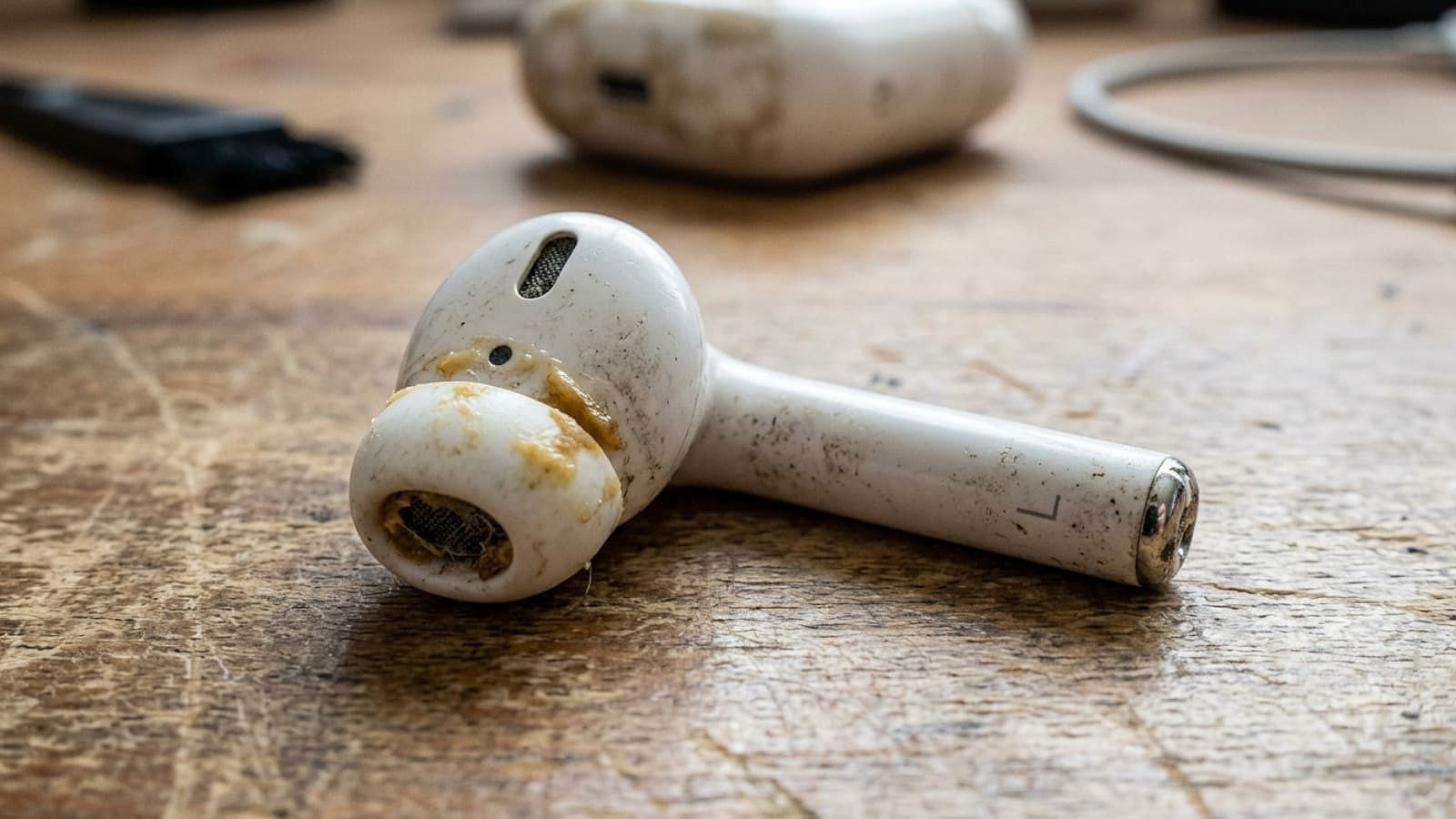
Earbuds and headphones have become everyday gadgets for music, calls, podcasts, gaming and watching videos. But because earbuds sit inside or close to the ear, they can quickly collect earwax, sweat, skin oil, dust and lint. Over time, that build-up can make the earbuds look dirty and can also affect sound quality, charging and microphone performance.
Cleaning them, however, is not as simple as washing them under a tap. Even models advertised as water-resistant should not be treated like waterproof gadgets. Water or cleaning liquid can enter speaker openings, microphones, charging contacts and other sensitive areas.
Manufacturers also have different cleaning instructions. Sony, for example, recommends a slightly damp cloth for certain sound-output areas but specifically warns against letting liquid enter the earbuds and says some models should not be cleaned with solvents such as alcohol. JBL’s instructions for some TWS models, meanwhile, recommend a cotton swab slightly moistened with alcohol for specific parts. This is why the manufacturer’s instructions for your exact model should always take priority.
Here is a practical guide to cleaning TWS earbuds, over-ear headphones, ear tips and charging cases, including what you should and should not do.
Why You Should Clean Your TWS Earbuds And Headphones
Earbuds are exposed to more than just earwax. Sweat from workouts, facial oils, dust from pockets and bags, and moisture from humid weather can all accumulate on the device.
That dirt can eventually reach the speaker mesh, microphones, vents and charging contacts. JBL notes that dust and earwax accumulation can contribute to low volume and left-right volume imbalance. Blocked openings can also result in muffled audio.
The charging case needs attention as well. Dust and lint can collect around the charging wells and contacts, potentially interfering with the connection between the earbuds and case. The USB-C port can also accumulate pocket lint.
There is a hygiene reason to keep them clean too. Earwax itself is normal and protective, but prolonged contact between dirty earbuds and the ear can contribute to irritation and moisture build-up. The World Health Organization says the ear is self-cleaning and advises against putting objects such as cotton buds inside the ear canal.
How Often Should You Clean TWS Earbuds?
There is no single cleaning schedule that applies to every person. How often you should clean your earbuds depends on how frequently you use them, whether you exercise while wearing them and how much sweat or earwax they encounter.
For people who use TWS earbuds every day, a good routine is to quickly wipe them after regular use and perform a more thorough cleaning every few weeks. Bose recommends thoroughly cleaning earbuds at least every two months, or more frequently depending on usage, while JBL recommends cleaning some models every few weeks.
Usage
Recommended Cleaning Routine
Occasional use
Wipe after use and clean thoroughly when visibly dirty
Daily use
Quick wipe regularly and deeper clean every few weeks
Gym/workout use
Wipe sweat away after every workout
Heavy earwax build-up
Inspect and clean the speaker mesh more frequently
Shared headphones
Disinfect appropriate external surfaces between users
The exact interval is less important than checking the earbuds regularly. If you can see wax, dust or sweat around the tips, mesh or charging contacts, it is time for a clean.
What You Need To Clean TWS Earbuds
You do not need an expensive electronics cleaning kit. In most cases, a few basic items are enough:
Microfibre or lint-free cloth
Dry cotton swabs
Soft-bristled brush
Small amount of mild soap for removable silicone tips
Lukewarm water for compatible removable ear tips
Isopropyl alcohol only if your manufacturer’s instructions permit it
A specialised earbud cleaning tool can also be useful, but it needs to be used gently. The objective is to remove debris rather than push it deeper into the speaker mesh.
How To Clean TWS Earbuds Step By Step
Before starting, remove the earbuds from your ears and switch them off if possible. Keep them away from the charging case while cleaning so that moisture does not get transferred into the case.
Step 1: Remove the ear tips. If your earbuds have detachable silicone tips, carefully pull them off. This gives you access to both the tips and the nozzle underneath.
Step 2: Inspect the speaker mesh. Look for visible earwax or dust. Do not immediately poke at it with a sharp object.
Step 3: Clean the outside. Use a dry microfibre cloth to wipe the body and remove sweat, fingerprints and dust.
Step 4: Clean the speaker opening carefully. Use the manufacturer’s recommended method. Sony, for example, advises using a slightly damp, firmly wrung cloth on certain sound-output meshes while warning users not to push debris into the earbuds or rub the mesh aggressively.
Step 5: Clean the microphones and vents. These tiny openings can collect dust and debris. Use a soft, dry brush or the cleaning method recommended for your specific model.
Step 6: Let everything dry. Do not immediately put damp earbuds into their charging case. The earbuds and removable parts should be completely dry before reassembly.
RTINGS similarly recommends gently working around, rather than aggressively through, grilles and vents so debris is not pushed into the device.
How To Clean Silicone Ear Tips
Silicone ear tips are easier to clean than the electronic portion of the earbuds because they can usually be removed and washed separately.
Take the tips off the earbuds and rinse or wash them using lukewarm water and a small amount of mild soap, provided the manufacturer permits this. Gently rub away earwax and dirt, then rinse thoroughly.
Dry them completely before putting them back on the earbuds.
Sony specifically recommends washing compatible ear tips by hand with water and neutral detergent and thoroughly removing moisture before reattaching them. It also recommends replacing ear tips that are heavily soiled or clogged.
Do not wash the electronic earbuds together with the silicone tips.
How To Clean Foam Ear Tips
Foam tips require more care because they are porous and can absorb sweat and skin oils. They may also deteriorate faster than silicone tips.
Instead of aggressively washing or squeezing foam tips, check the manufacturer’s instructions. If the foam has become discoloured, damaged, permanently compressed or difficult to clean, replacement is often the better option.
A fresh pair of ear tips can also restore the seal and comfort of earbuds when the original tips have become worn.
How To Clean The TWS Charging Case
The charging case is often forgotten, even though it can collect considerable amounts of dust and lint.
Start by removing the earbuds from the case. Turn the case off or disconnect it from charging, then wipe the outside with a dry microfibre cloth.
For the inside, use a soft, dry brush or cotton swab to remove loose dirt. Pay particular attention to the small wells where the earbuds sit.
The charging contacts should be cleaned carefully. JBL recommends a slightly alcohol-moistened cotton swab for certain products, while Bose recommends a dry cotton swab for earbud charging contacts and warns against getting water into charging ports.
Never pour liquid into the charging case.
If there is stubborn debris around a charging contact, use the cleaning method specified in the manual for your exact model rather than experimenting with water or household cleaners.
How To Clean Over-Ear And On-Ear Headphones
Full-size headphones have different cleaning requirements because they have larger ear cushions, headbands and exposed surfaces.
Start by removing the ear cushions if they are designed to come off. Wipe the exterior of the headphones with a dry or manufacturer-approved slightly damp microfibre cloth.
The ear cushions deserve particular attention because they come into direct contact with the skin. Sweat and oil can accumulate quickly, particularly during summer or workouts.
For leather, faux leather, fabric and memory-foam cushions, use the manufacturer’s recommended cleaning method. Do not assume that a cleaning product that works on silicone earbuds is safe for headphone cushions.
After cleaning, allow the cushions to dry completely before wearing the headphones again.
What About Headphone Speaker Mesh?
Speaker mesh should be treated as a delicate component. Dust can be brushed away gently, but aggressive rubbing can deform or damage the mesh.
If you can see earwax stuck inside the grille, do not push it further into the driver. Sony specifically warns users to avoid pushing debris into sound-output holes and says clogged openings should be cleaned carefully.
If the blockage is deep inside the headphone rather than sitting on the surface, professional servicing may be safer than trying to dig it out yourself.
Can You Use Rubbing Alcohol To Clean Earbuds?
This is one of the most important questions because there is no universal answer.
Some manufacturers provide instructions that permit alcohol on specific surfaces. JBL, for example, recommends a cotton swab slightly moistened with alcohol for certain TWS products.
But Sony explicitly warns against solvents such as thinner, benzene or alcohol for some of its earbuds.
Therefore, do not automatically use 70% isopropyl alcohol just because it is commonly recommended online. Check your specific model’s cleaning instructions first.
If alcohol is permitted, use only a small amount on an appropriate cloth or cotton swab. Never pour or spray alcohol directly onto an earbud.
Never Do These Things While Cleaning Your Earbuds
Do not soak TWS earbuds in water.
Do not spray cleaner directly onto the earbuds.
Do not push cotton buds deep into speaker openings.
Do not use pins or sharp metal objects aggressively.
Do not force earwax deeper into the mesh.
Do not put damp earbuds straight into the charging case.
Do not assume an IP rating means you can wash the earbuds.
Do not use alcohol unless the manufacturer allows it for that model.
Do not use household glass cleaners, bleach or strong solvents.
Do not use excessive force on speaker grilles or microphone openings.
Water resistance is not the same as permission to submerge or wash an electronic device. Even where a product has an IP rating, its manufacturer may have specific restrictions around cleaning and charging.
Should You Clean Your Ears Before Cleaning Your Earbuds?
Yes, but there is an important distinction: do not try to remove earwax from deep inside your ear yourself.
The WHO says the inside of the ear is self-cleaning and advises against putting cotton buds, oil, sticks or other objects into the ear canal. Earwax is normal and helps protect the ear.
Clean the outer ear gently with a soft cloth instead. If you experience pain, discharge, persistent itching, hearing difficulty or significant wax blockage, seek advice from a healthcare professional rather than attempting aggressive home cleaning.
Why One Earbud Can Suddenly Sound Quieter
If the left and right earbuds suddenly have different volume levels, do not immediately assume the speaker has failed.
Check the speaker mesh first. Earwax and dust can block the sound output and make one side appear quieter. JBL specifically identifies earwax and dust accumulation as a possible cause of low volume and balance problems.
Also check:
Whether the ear tip is clogged
Whether the speaker grille is dirty
Whether the microphone or vent is blocked
Whether your phone’s left-right audio balance has changed
Whether the earbuds are correctly seated in your ears
Whether the problem remains after cleaning and reconnecting the earbuds
If cleaning does not fix the problem, the issue could be software, battery-related or hardware-related and may require further troubleshooting.
How To Keep TWS Earbuds Cleaner For Longer
A little maintenance can prevent most serious build-up.
Wipe the earbuds after workouts or heavy sweating.
Keep the charging case clean.
Do not leave earbuds loose in pockets or bags.
Store them in the charging case when not in use.
Keep the ear tips dry before putting them back on.
Inspect the speaker mesh regularly.
Clean the charging contacts if you notice dirt or charging problems.
Replace worn or heavily contaminated ear tips.
Bose recommends regular wiping, while JBL advises periodic cleaning to help prevent dirt from affecting charging performance.
Do Not Ignore Sweat And Humidity
For people who use earbuds while exercising, sweat deserves special attention. Even if your TWS earbuds have some level of water resistance, sweat and moisture should not be allowed to sit on the device unnecessarily.
After exercising, remove the earbuds and wipe them with an appropriate dry or manufacturer-approved cloth. Let them dry before placing them in the case.
In humid conditions, also check the charging contacts and the inside of the case. Moisture trapped inside the case is something you want to avoid.